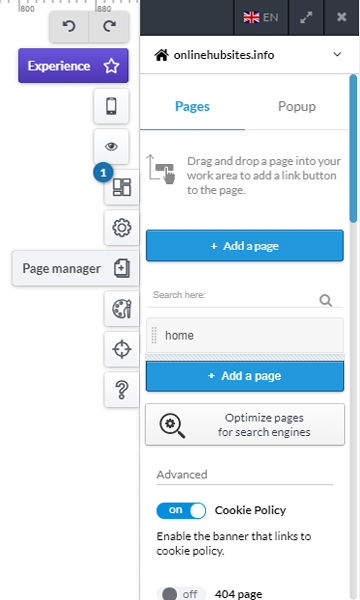
Managing and adding pages
The Page Manager section on the right side of the Online Editor, allows you to reach every page of your website, even those that have not yet been added to the menu.
From the Page Manager, you can:
rename the page by double-clicking on the Page field. By renaming the page you will be asked if you want to rename the menu item linked to the page.
delete a page by clicking on the trash icon, hovering the mouse on the entry you want to delete.
add a new page by clicking on Add Page.
add an already existing page to the navigation menu by clicking on the area grid to the left of the Page field and dragging it into the navigation menu.
duplicate, or paste the page: in this way you will be able to create a new page, starting from the model of the duplicate page (this feature is useful if you need to create a page very similar to an existing one).
Always check and make sure that the pages of your website correspond to the entries of the navigation menu.
To better manage the links between the pages and the menu, follow the instructions on adding a menu.